Power Management System

Electricity

Power Management System

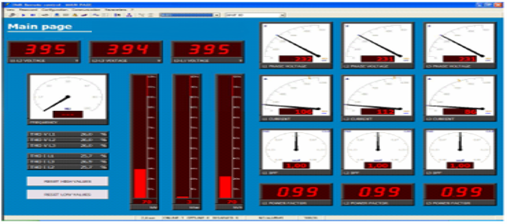
  • Supply Installation, Testing and Commissioning of Power Monitoring Software with Programming, Setting & Testing.
electricpowermanagementsystem
Power Management System

Empowering Efficiency, Ensuring Safety.

1. Supply of Power Monitoring Software
  • Selection of Software: Depending on the facility’s requirements, suitable power monitoring software is chosen. Some popular options include Schneider Electric’s EcoStruxureâ„¢ Power Monitoring Expert, Siemens’ SENTRON Power Manager, or other equivalent systems.
  • License and Hardware Requirements: The software is supplied along with the required licenses for use. It may also come with additional hardware components like data acquisition units (e.g., smart meters, sensors, communication modules) to facilitate real-time monitoring and data collection.
  • Compatibility Check: The software is compatible with the electrical systems in the facility, including integration with power meters, relays, protection devices, and other power management hardware.

2. Installation of Power Monitoring Software
  • Hardware Installation:

    • Smart Meters: If the existing infrastructure does not include smart meters, these are installed at critical points such as incoming panels, distribution boards, and loads.
    • Communication Network Setup: Data acquisition devices, smart meters, and sensors are connected through communication protocols like Modbus RTU, Modbus TCP/IP, or IEC 61850 to the central server that will host the monitoring software.
    • Wiring and Cabling: The meters and sensors are connected to the central data server using appropriate cabling (Ethernet cables, fiber optics, etc.) as per the design.
  • Software Installation:

    • Server/Workstation Setup: The software is installed on a dedicated server or workstation with the necessary system requirements (RAM, storage, etc.). For larger systems, cloud-based solutions may also be considered.
    • Database Configuration: A database (e.g., SQL Server) is set up to store and retrieve data collected by the power monitoring system.
    • Configuration of Data Acquisition: The software is configured to communicate with installed meters, sensors, and other power equipment, ensuring accurate and timely data flow.

3. Programming, Setting & Configuration
  • Meter and Device Integration:

    • All connected devices (smart meters, protection relays, etc.) are programmed and configured to work seamlessly with the monitoring software.
    • Communication settings such as baud rate, IP address, and port numbers are programmed to ensure smooth communication between devices and the server.
  • Parameter Setting:

    • The software is programmed to monitor key electrical parameters such as voltage, current, power factor, energy consumption, harmonic distortion, power quality, etc..
    • Custom thresholds and alerts are set for critical parameters. For example, the system can be programmed to send alerts when voltage levels exceed limits, or when power factor falls below the acceptable range.
  • Energy Profile Configuration:

    • Profiles are set up to record and display energy consumption trends for different periods (hourly, daily, monthly) and across different sections of the facility.
    • Tariff structure settings are entered to provide insights into the cost of energy consumption and inefficiencies.
  • Demand Management:

    • Peak demand limits are programmed into the system, and it can be set to trigger alarms when power demand exceeds the predefined limits.
    • Automatic actions, such as load shedding, can be configured to prevent overloading.

4. Testing & Commissioning
  • Functional Testing:

    • Point-to-Point Testing: Each meter, sensor, and relay is tested for communication with the software to ensure data is being accurately captured and displayed.
    • Parameter Verification: Verify that all electrical parameters such as voltage, current, power, and energy are being measured correctly by comparing real-time data from the software with readings from handheld test equipment.
  • Communication Testing:

    • Network Connectivity: The communication between the devices and the server is tested to ensure stable and reliable data flow using Modbus, IEC 61850, or other communication protocols.
    • Data Integrity: The system is tested for data accuracy and integrity to ensure no loss or corruption occurs during data transmission and storage.
  • System Integration Test:

    • If the software is integrated with other facility management systems (like Building Management Systems, SCADA, or Energy Management Systems), the integration is tested to ensure seamless communication between the systems.
    • The system is also tested for load balancing, system backup, and redundancy.
  • Alarms & Reporting:

    • The alarm system is tested to ensure that alerts are triggered when preset thresholds are exceeded.
    • The reporting system is checked to confirm that accurate reports can be generated on-demand or automatically based on pre-set schedules.
  • Real-Time Monitoring:

    • After the system is fully commissioned, real-time monitoring is initiated, allowing operators to view real-time power conditions, spot anomalies, and manage power consumption effectively.
    • Historical data is also validated by checking the recorded trends for accuracy.

5. Training and Handover
  • Training:

    • The end-users (facility managers, electrical engineers, operators) are trained on how to use the power monitoring software, including navigation through dashboards, data analytics, and report generation.
    • Training on alarm management, troubleshooting, and maintenance of the system is also provided.
  • Documentation:

    • All relevant documentation, including system architecture, software configuration settings, communication protocols, and device manuals, is handed over to the client.
  • Maintenance Plan:

    • A maintenance plan is provided for periodic software updates, recalibration of meters, and general system upkeep to ensure continued accurate monitoring and reliable performance.

6. Ongoing Support & Optimization
  • Remote Monitoring & Diagnostics: Some systems can offer remote monitoring services to provide real-time diagnostics and support.
  • System Optimization: After a period of usage, system performance is analyzed, and any necessary tweaks or optimizations are carried out. This includes adjusting thresholds, optimizing energy profiles, and integrating additional data points if required.

Benefits of Power Monitoring Software:
  • Energy Efficiency: Helps in identifying areas of high energy consumption, allowing for optimizations that can lead to energy savings.
  • Operational Efficiency: Provides insights into power quality issues, fault conditions, and load patterns, helping prevent equipment damage and reducing downtime.
  • Cost Management: Allows for better tracking of energy usage and cost allocation based on the consumption data for different areas or processes.
  • Sustainability: Promotes sustainable energy usage by tracking energy waste and promoting corrective actions like load balancing and demand-side management.

By effectively implementing and commissioning the Power Monitoring Software, facilities can gain comprehensive insights into their energy consumption and power quality, leading to improved efficiency, cost savings, and enhanced operational performance.

background. Engin
png clipart power station combined cycle natural gas electricity coal coal miscellaneous city thumbnail e1731135962144

EVERYTHING YOU NEED

What We Provide

secure shield 1

Trouble Shooting 24/7

This emergency call out service can usually be arranged within 3 hours of receiving a phone call.

secure shield 1

Transformers Services

Installation, Testing, Commissioning and Maintenance of Transformers.

secure shield 1

Switchgears Services

Installation, Testing and Commissioning of Panels and Relay Grid Panel.

secure shield 1

Solar Services

Our services includes Site assessment, Installation, Net Metering, Maintenance and Cleaning of Solar Panels.

secure shield 1

Electrical Protection Services

Installation, Programming, Setting, Testing and Commissioning of Protection Relays.

secure shield 1

Protection Automation Services

Supply Installation, Testing and Commissioning of SCADA System,.(BMS) & PLCs.

secure shield 1

Power Management System

Supply Installation, Testing and Commissioning of Power Monitoring Software with Programming, Setting & Testing.

secure shield 1

Cable Tray & Cable Laying Services

Supply & Installation of Cable trays. Testing of H.V & L.V Cables.(Hipot & IR).

secure shield 1

Bonding, Grounding & Earthing Services

Supply & Installation of Earthing Cable, Earthing Rods & Earthing Plates.

secure shield 1

Technical Training

Our portfolio of Technical Training courses cover the vast majority of Electrical Engineering skills.

secure shield 1

Spare Parts & Spare Parts Management.

All Cables (11 KV, 415 V , Control Cable, Fiber Optic) .Electrical Plugs and Connectors.

OUR VALUED CUSTOMERS

Building Strong, Long Relationships

Let's Chat